Showing posts with label Enrichment Block. Show all posts

Wednesday, November 14, 2018

Student Newspaper

The 5th graders who aren't in band come to library twice a week for enrichment activities. For the past few weeks we have been working on a student newspaper and today it finally went to press! The kids were thrilled to print, fold, and deliver them to the students and teachers in grades 3-5.


You can read it online here: DBS News - Issue 1

Wednesday, May 31, 2017

Research and presentations in Enrichment Group

For our final Enrichment groups the students were tasked with choosing a topic, doing some research, preparing a presentation, and presenting first to the group and then to their class.  We started with a lesson on how to find information in the library and the students played a game that required them to utilize the Dewey Decimal System to find books.  The following week we talked about how to do research online and how to determine if the information if fact or opinion.  After the lesson both days the students had time to do some research on the topic of their choice.  For the third lesson we talked about different ways to present information, either physically or digitally.  The students were given a choice of three presentation methods (poster, Padlet, or Google Slides) and had time to start their presentations.  For the remaining classes they worked on their research and presentations.

I was surprised and pleased with the variety of topics they chose.  We learned about gorillas, dolphins, Labradors, dog behaviors, Ancient Egypy, common languages of the world, God, Phillipa Soo, and how to speak Hawaiian.

Second graders presenting on Ancient Egypt.

A Padlet presentation about chimpanzees.

A Padlet presentation about dolphins.

A Google Slides presentation about dogs.
Unfortunately we had some scheduling conflicts so the fourth and fifth graders didn't get to present to the group.  I encouraged them talk with their teachers about presenting to the class instead.

Inquiry-based learning is where we are all headed, so I really enjoyed this chance to let the students choose their own topics and fully own their learning.  I was impressed with the information they learned.

Presentations (click on the images to view full presentation)


Google Slide presentations
Simone Biles


Still in progress...


Google Slide presentations still in progress...
Languages

God and the Bible


Wednesday, April 12, 2017

Research in Enrichment

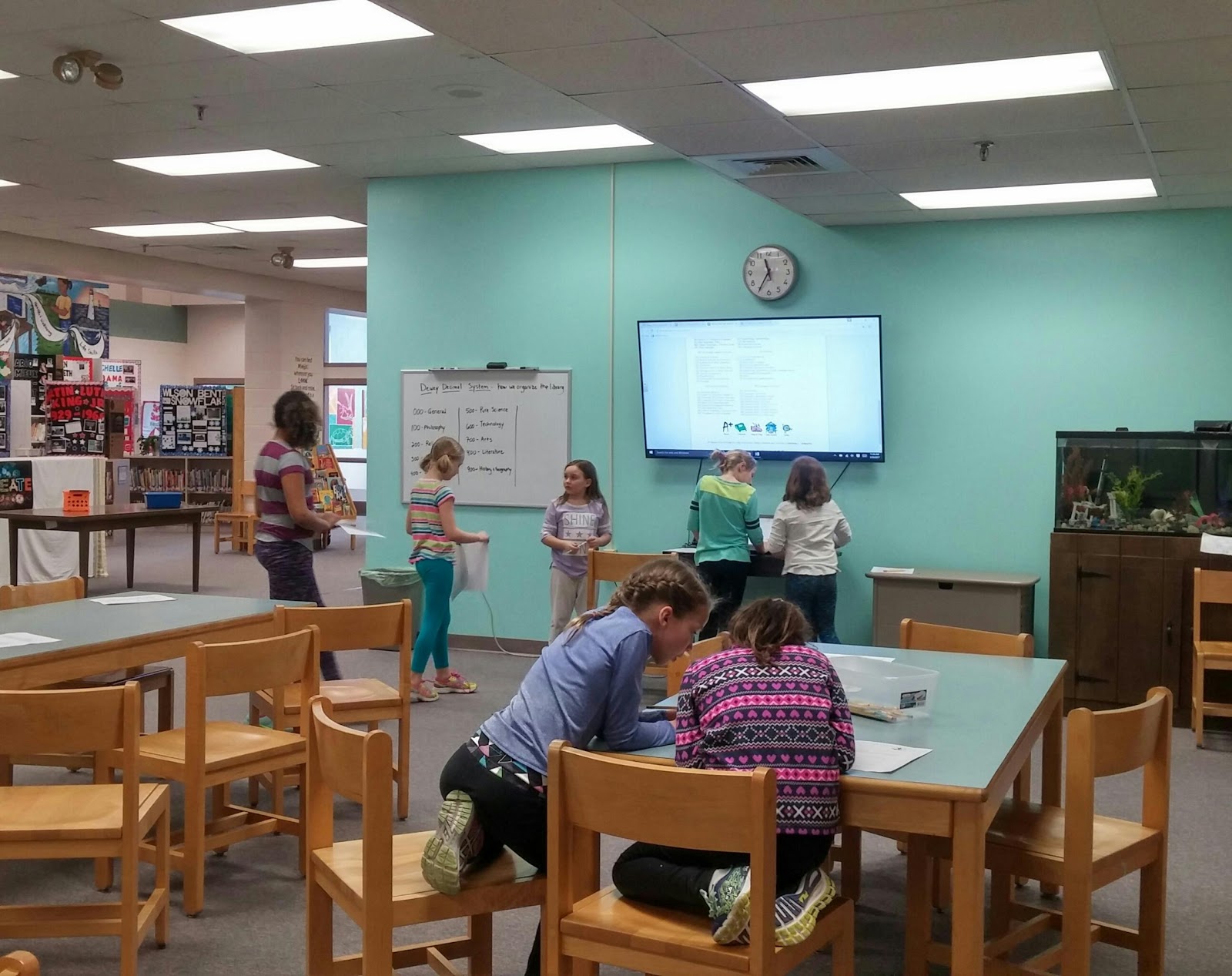
Enrichment group this session is all about research and presentation. The first week we talked about finding information in the library, the second week we talked about finding information online, and this week they spent the class finding information! Each student (or group) got to choose a topic of their choice and they were tasked with finding 3-5 different sources and at least 5 facts about their topic. Next week we will discuss different ways to present the information to an audience and the students will get to choose how they want to present their topic.

In this photo students are researching dogs, chimpanzees, dolphins, and ancient Egypt.  I love how excited they all are and how eager they are to share their information with others.
   

Wednesday, March 29, 2017

Research and presenting

In enrichment this session we are learning about different ways to research and then how to present what you've learned.  First step, how to find in formation in the library.  These kids were excited to learn about the Dewey Decimal System.

Sunday, March 26, 2017

BB-8 Wrap-up

We got to play with a Sphero BB-8 robot for a month through the Vermont Robot Rodeo program.  The kids were pretty excited!  Ok, I was too!  Each class got a turn to see it and help me program it.  I was hoping to let each kid get a turn to program it individually during the time we had it, but unfortunately that didn't work out. It became difficult to manage one robot/iPad shared across an entire class of overly excited students.  I did try to get it into as many hands as manageable though.  Some students earned time with the robot for good CSR behavior and others were allowed to use BB-8 during their agreed upon break times.  We also used BB-8 and Dash for the enrichment group project.

The 4th and 5th graders, and the 2nd and 3rd graders, were tasked with creating an obstacle course and programming BB-8 to complete the course.  I also asked them to take photos and videos of the process so we could compile them into a final project to present.

The 4/5 group created their course using masking tape, cardboard, felt, Imagination Playground blocks, and Keva planks.  The 2/3 group experimented with masking tape tracks, unifix components, and Imagination Playground blocks and tracks.

We all learned a few valuable lessons!
  • The Sphero BB-8 robot is harder to control than any of us expected!
  • It's easy to create a cool track, but frustrating each time you have to simplify it for the robot.
  • Eight-eleven kids trying to share one robot/iPad is tricky.  I brought in my Dash robot to help alleviate this problem, but the kids still really wanted to make BB-8 run the obstacle course!
  • Dash is a lot easier to control and more predictable with it's behaviors.
  • Technology troubles are super frustrating!  We had battery issues with Dash, "head" issues with BB-8, connectivity issues with both, and always the risk of low battery.
  • Programming is fun!!

The 4th and 5th graders compiled their videos and photos into a final presentation to share:


The 2nd and 3rd graders ran out of time to make their movie, so I pulled their videos and photos together into a presentation:


With a lot of time and missed recesses (their choice), the 4/5 group was able to get BB-8 to mostly complete the track they had designed, with a few track modifications (removed ramps and stage).  The 2/3 group went through several track revisions and ran out of time to finish the track.  They had more difficulty with the programming as well.  Lots to learn for all of us!

I'm planning to keep Dash at school, or maybe buy a school one so my kids can have theirs back!  We also have Lego WeDos available, and EV3s for the more advanced programmers.  Everyone agreed that enrichment group is fun and robots are cool.  :)

Wednesday, March 15, 2017

Getting creative

Third graders pulled out the Imagination Playground blocks to augment their BB-8 track today.  It was great to hear their ideas develop and see the teamwork!  We have one more week with BB-8 before we have to send him on his way.

Wednesday, March 8, 2017

Teamwork!

Second and third graders building an obstacle course for BB-8 and Dash.  This is what learning looks like!

Wednesday, March 1, 2017

Taking apart BB-8

We can't take apart our BB-8, but we can watch someone else do it!  The robot makes a lot more sense when you know how it works inside!

Monday, February 27, 2017

Planning...

Today's 4/5 enrichment group started planning an obstacle course for BB-8.  This looks like a challenge! 

Friday, February 17, 2017

2nd & 3rd grade enrichment

The Jan/Feb enrichment block was all about robots! The kids learned what robots are, how they work, and then (finally!) got to make their own. Unfortunately we had lots of snow days that got in the way of all academics, including enrichment, so the 4/5 group didn't have time to make a video to share, but 2/3 got to! Here is the video being shown at this mornings assembly.


Sunday, February 5, 2017

What can robots do in school?

This week in enrichment we are talking about what kind of jobs robots can do, and what can they do in school?! I challenged the students to come up with a robot (or idea) that could serve a function in school. This task is extra challenging given the time and materials constraints they are working within. The kids jumped right in though and came up with lots of great ideas!

This guy thought his lion could be used in PE class to demonstrate push-ups or supermans.


These two are working on a pencil delivery system. Their robot will roam the room with sharpened pencils, collect dull ones, and (maybe, somehow) sharpen them. These girls were so into their project that they spent all of recess that day telling me about their ideas for how to get the robot up to the pencil sharpener, how to make it hold a pencil, and how to make it use the sharpener. Their brains were hard at work!


I'm not sure what this chompy alligator can do in school, but I know it does an excellent job of amusing students and teachers alike! :)


Wednesday, February 1, 2017

Lego WeDos

The second and third graders in Enrichment group are working with Lego WeDo kits, which are excellent beginner kits for learning programming and robotics. We have the originals that plug in to the computer, and the newest models that work with Bluetooth and allow for a more mobile robot.

I love their excitement when things work!

Tuesday, January 24, 2017

What is a robot?

In Enrichment group this month we are talking about robots. What is a robot?  What makes something a robot?  (and when get we get our hands on the robots?!?!)  The two groups looked through non-fiction books about robotics and tried to come up with a definition of a robot, then they thought of lots of different things they have experienced or heard of and as a group we sorted them into Yes/Maybe/No categories based on whether or not the group thought it met the qualifications for a robot.

They all agreed that a robot is something that runs on electricity and is programmed by humans (or other robots!)  They all agreed that the robot had to do some sort of job or task, though there was some debate about what that meant.  Does toasting bread count as a task?  Answering questions?  Turning on the power (like a switch or button)??  They also thought, initially, that a robot has to be able to move, but when the discussion got deeper they started to question that assumption.  Does Siri or Amazon's Echo count as a robot?


Dictionary.com says a robot is "a machine that resembles a human and does mechanical, routine tasks on command."  Does it have to resemble a human?  The robots in the Tesla factory don't look human.

Google says a robot is "a machine capable of carrying out a complex series of actions automatically, especially one programmable by a computer." Programmable by a person first?  Or are they considering the "brains" inn a robot to be the computer programming and the physical part, the part that completes the actions, to be the robot?

NASA says a robot is "a machine that is built to do a certain job again and again, or to do work that might be dangerous for humans."  They should know, right?


I challenged the students to think about specific items and decide if it is a robot or not.  They had to think about a toaster, a copy machine, a smart phone, and a Mars rover.  They found it interesting that there isn't exactly a right or wrong answer since there isn't an exact definition of "robot."

What Is A Robot?, an article on wired.com, quotes Andy Rubin, father of Android, as saying, a robot must sense, it must compute, and it must acute.  By that definition a stop light isn't much different from a Roomba vacuum cleaner.  Scott Dadich, the articles author, goes to on to say that as robots because more social perhaps we need to add a fourth criteria: to relate.  He says,"Maybe that’s a fourth step that Rubin didn’t think he had to articulate: sense, compute, actuate … and then relate to us. When that starts to happen, we’re going to want to rethink our definition of robot yet again."

Finally, FINALLY, I let them do what they really wanted to do: make a robot!!!


Monday, December 19, 2016

Paper Circuits

We have been learning about electricity in enrichment groups this month and today the 4th and 5th graders got to experiment​ with "paper circuits," electrical circuits made on paper using copper tape and tiny LEDs.   
I really wanted to give them two days to experiment with this project, but we lost a day to the weather last week and next week is vacation.  I'm going to have to work this in again later in the year because the kids loved it.
(I took a really cute picture of a student holding a finished card, but my phone didn't save it!! )

Thursday, October 27, 2016

Programming

We have lots of programming going on in the enrichment blocks. The younger kids worked on "offline programming" such as writing instructions for how to open a door, or how to do a dance, then moved on to code.org. They are loving it, though some definitely find it more challenging than others. This week we had a little chat about "helping" versus "doing for" as I noticed one kid had taken over her friends laptop and was doing the work for her friend. I asked what they were doing and the first girl said, "Oh, I'm just helping her." I paused the programming for a quick chat about how best to actually be helpful. :) I love seeing them work together though and many of them are very good at helping one another.

The older kids ended up with some extra sessions and were thrilled to continue with their Scratch programming. After several kids showed their programs at the Unity Day assembly, everyone was eager to try their hand at making a game for their classmates to play. You know the kids are engaged in their learning when they ask to come in at recess or after school to finish "just one more thing."

Next up, digital book reviews!

Friday, October 21, 2016

Unity Day

Dothan Brook is an amazing school. In case you weren’t aware, October is National Bully Awareness Month and our school is tackling that issue head on! Our school councelors have done an amazing job of exploring bullying prevention and the students, from pre-k up to 5th, are all familiar with the three signs of bullying and what to do about it. We have excellent examples of students standing up for one another in school, on the bus, and out of school. Ask any kid and they will tell you exactly what bullying is and how it can be stopped.  All week I read the classes books about bullying and they were so proud that those times of situations don't happen at DBS. 

All week the students have been making signs and banners, pencil toppers, wrist bands, and more to prepare for the big day. The students and staff have bright orange “Otters Don’t Bully” t-shirts and everything is decked in orange, the official color of bullying prevention.

On Thursday we held a Unity Day celebration, starting with a very orange group walk to school (see the DBS Facebook page for some great photos!).  At the end of the day there was  school-wide assembly where they showed projects students had made, built a chain of bullying prevention messages, heard the story One be read by two 5th graders, and had a performance by the Select Chorus.  The energy was was high and the students were excited. 


The Unity Day chain, with a link from each student, stretches across the length of the gym.
These students are from my 4th/5th grade enrichment group.  We worked on anti-bullying projects using Scratch programming. The kids only had a few days, but the were committed to showing great projects at the assembly and several of them came in during lunch or recess or study hall to complete and refine their projects.  I was excited to see the enthusiasm for both the message and the technology!
 
Enrichment group students showing their anti-bullying projects.
I feel so fortunate to be working at a school so committed to each and every student.  I couldn't ask for a better environment to spend my days. 

Friday, October 7, 2016

2/3 Enrichment Block

I'm so excited about the enrichment blocks we've started.  Twice a week I'll get a small group of kids, selected by their teachers as kids who could use a little academic enrichment, and we will do fun things.  The program will vary as the year goes on.  Right now my 4th/5th group is working on Scratch programs and my 2nd/3rd group is learning the fundamentals of programming.  On day one we started with a series of "unplugged" activities that demonstrate programming without a computer.  The kids loved it!  At the end I have them a challenge to write a dance "program" on paper that we can all do at the next class.  I can't wait to see if any of them do it!